
For most small hosts, the thrill of the first booking is followed by the realization of the first tax season. You log into your Airbnb portal, see a healthy gross earnings figure, and then realize your bank account tells a different story.
Managing a short-term rental is a high-turnover logistics business. To understand if you are actually making money, and to ensure you do not overpay the IRS, a dedicated Airbnb expense spreadsheet is your most important tool.
TL;DR
- Airbnb’s gross earnings figure doesn’t reflect true profit — a dedicated expense spreadsheet is essential for understanding your actual margin.
- In the U.S., most Airbnb income is reported on Schedule E (Form 1040), which allows deductions for operating costs most hosts miss.
- Track the full guest payment as revenue and cleaning fees plus platform commissions as separate expenses — don’t just track your bank payout.
- Bulk payouts bundling multiple reservations are the most common manual tracking failure point.
- Once you hit 3–5 properties, a manual spreadsheet becomes a liability rather than a tool.
Use a spreadsheet to track true profit
Many hosts rely solely on Airbnb’s built-in earning reports. While these provide a high-level view, they do not account for the hidden costs of doing business.
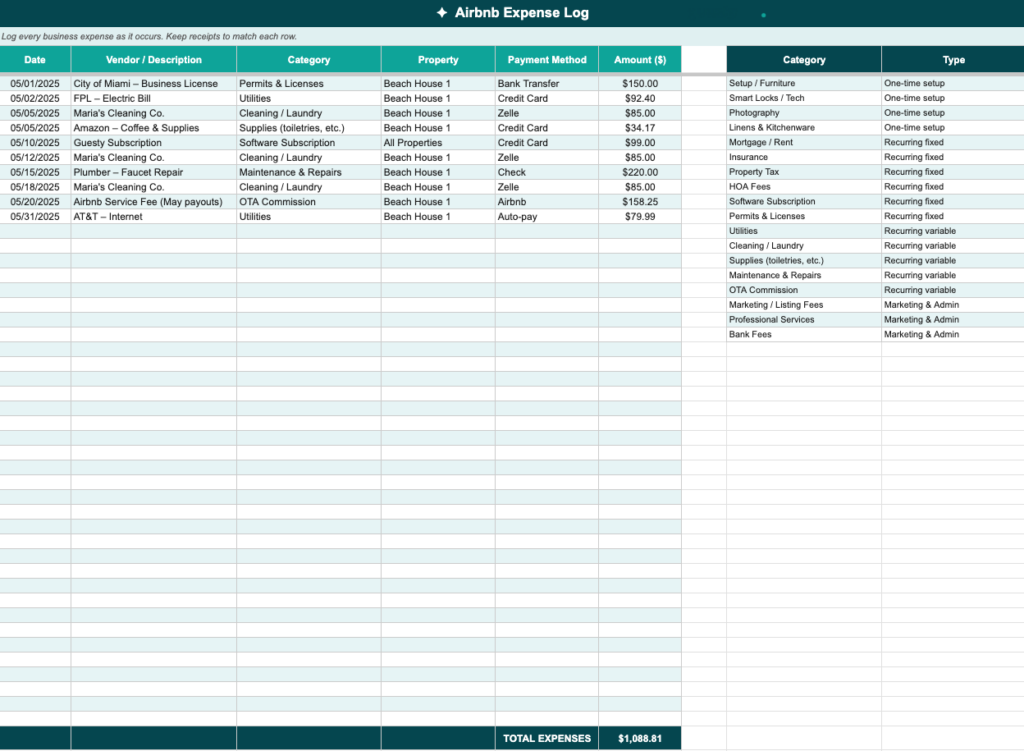
👉 Get your free Airbnb expense spreadsheet → Start tracking income and expenses today , no signup required.
Claim tax deductions through schedule E
In the United States, most Airbnb income is reported on Schedule E (Form 1040). This allows you to deduct ordinary and necessary expenses. Without a detailed spreadsheet, you will likely miss smaller deductions like streaming subscriptions for guests, cleaning supplies, or the prorated cost of your home’s high-speed internet. Over a year, these omissions can cost you thousands in overpaid taxes.
Understand true ROI vs gross revenue
Airbnb’s gross earnings figure includes the cleaning fee and the platform’s commission. It does not subtract your mortgage, utility spikes, or emergency repairs. A spreadsheet shifts your focus from revenue to profit. This helps you determine if your nightly rate actually covers your overhead.
Categorize expenses to match tax requirements
To make tax season efficient, organize your spreadsheet into categories that mirror IRS requirements.
Track operating expenses and consumables
These are the recurring costs of hosting. Guest supplies include coffee, toiletries, paper towels, and welcome baskets. You must also track linens and towels that require replacement due to wear. If you pay a third-party cleaner, track these fees as an expense even if you pass the cost to the guest.
Record maintenance and repairs
These costs are often unpredictable but protect your asset. Routine maintenance includes landscaping, pool service, and HVAC filter changes. Ad-hoc repairs cover fixing broken appliances or patching drywall. Capital improvements, such as a new roof, may need to be depreciated over time rather than deducted immediately.
Monitor utilities and fixed costs
If the property is a dedicated rental, these costs are straightforward. If it is a shared space, calculate a percentage based on square footage or usage. This includes electricity, water, gas, high-speed internet, streaming services, and short-term rental insurance premiums.
Log platform and professional fees
Airbnb’s host-only fee is typically 3%, while Vrbo charges around 5%. Booking.com and other platforms may take 12–15%. Record the actual commission per platform rather than estimating. You should also record software fees for dynamic pricing tools or channel managers. Include legal and accounting costs such as LLC filing fees or CPA expenses for filing your returns.
Boost your short term rentals today
Structure columns for data integrity
A good spreadsheet functions as a database. Use specific columns to keep your data organized and ready for analysis.
Set up essential columns
Each entry should include the date of the expense, the category (operating, maintenance, or utility), and the vendor where you spent the money. You should also record the total amount spent and include a checkbox to indicate if the item is tax-deductible. Tracking the reservation ID is optional but helps link guest-specific repairs to a specific stay.
Avoid the payout vs revenue trap
One major headache for small hosts is the payout vs revenue trap. If a guest pays $500 total, with $400 for the stay and a $100 cleaning fee, Airbnb takes its 3% from the full $500. You then pay your cleaner the full $100. If you only track the $385 payout received in your bank, you under-report both your income and your expenses. Your spreadsheet should show the full $500 as revenue and the $100 cleaning fee plus the $15 commission as separate expenses.
Compare manual and automated tracking
As you grow from one property to multiple listings, the time required to manage a spreadsheet increases.
| Criteria | Manual spreadsheet | Automated software (PMS) |
|---|---|---|
| Time spent | 5–10 hours per month | < 1 hour per month |
| Accuracy | Prone to human error | Real-time data sync |
| Tax-readiness | Requires manual sorting | One-click Schedule E reports |
| Scalability | Becomes unwieldy beyond 3-5 properties | Built for unlimited growth |
For hosts who spend more time on data entry than guest management, Guesty Lite™ is a practical next step. It is designed for hosts with 1–3 listings and automates the collection of reservation data to stop you from manually untangling payouts.
Avoid common manual tracking pitfalls
Manage bulk payout complications
Airbnb often bundles multiple reservations into a single bank deposit. If you receive a $2,400 payout, a manual spreadsheet makes it difficult to split that money. You have to determine which portion belongs to a specific property or a holiday rate. Without automation, you must cross-reference your Airbnb transaction history against your bank statement. This process is a reconciliation nightmare.
Capture minor recurring costs
Small, recurring fees are profit killers. If you buy a $15 guest treat for every booking and host 100 guests a year, that totals $1,500 in untracked expenses. Manual spreadsheets often miss these because they feel too small to record individually.
Scale your business with professional tools
Manual tracking has a ceiling. Once a host reaches 3 to 5 properties, the spreadsheet becomes a liability, and the risk of missing a tax deduction or miscalculating a payout to a co-host increases significantly.
Guesty’s accounting features eliminate manual data entry. When a reservation confirms, the system automatically assigns revenue and expenses to the correct ledger, generates owner statements, and produces financial reports ready for your CPA.
Choose the right tools for your portfolio size
Guesty Lite (1–3 listings) automates reservation data collection and eliminates manual payout reconciliation for smaller hosts. Guesty Pro™ (4–499 listings) provides integrated accounting, trust accounting, and one-click financial reports for growing management companies. Guesty Enterprise™ (500+) delivers custom financial workflows and dedicated support for large-scale operations.