Market saturation is high, as countless operators compete for the same guests. To stay on top, you need direct action to put your properties front and center. Google Business Profile (formerly known as Google My Business) helps solve this.
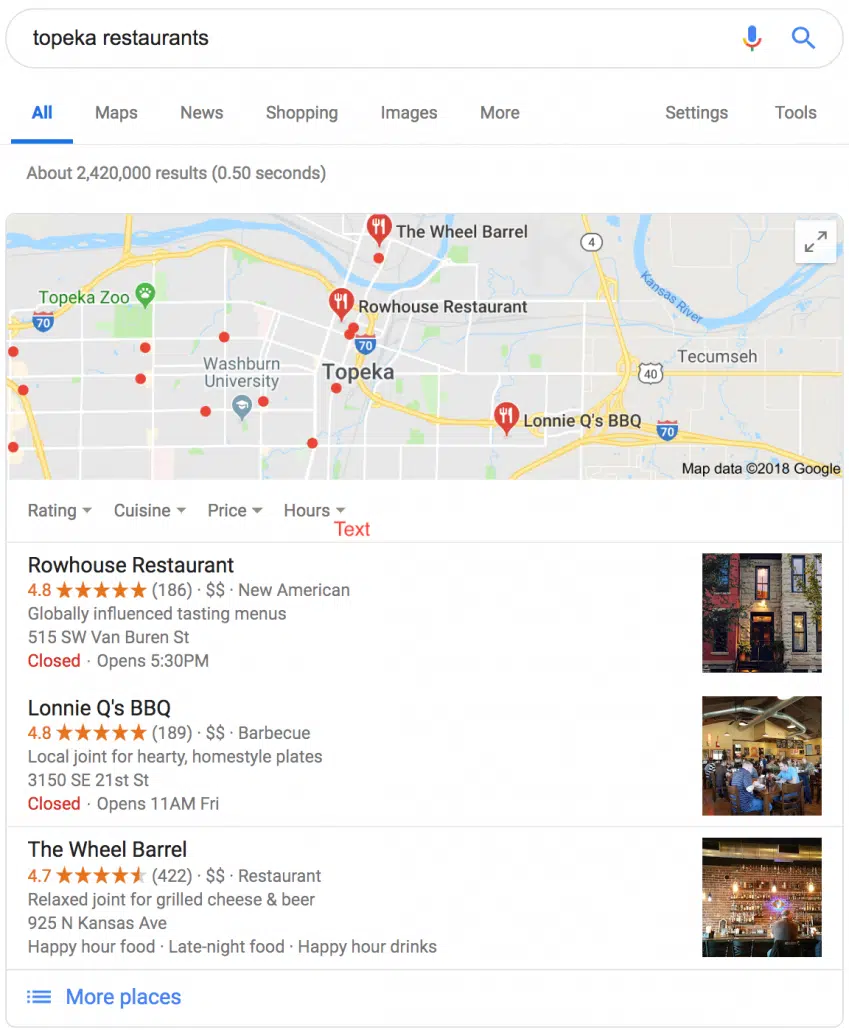
This free tool helps businesses manage their presence across Google Search and Google Maps. It functions as prime digital real estate. When users search for a service, they see the “map pack.” These local results match the search intent. That is your target guest looking for a place to stay.
Featuring your rental here puts you in front of high-intent customers. This guide walks through how to set up your profile and map your inventory.
TL:DR
- Google Business Profile lists your vacation rentals on Google Search and Maps.
- It helps you appear above large online travel agencies (OTAs), driving direct bookings.
- An optimized profile increases your visibility and builds guest trust.
- Regularly update your information, including photos and operating hours.
- Collecting and responding to guest reviews boosts your ranking and reputation.
- Verification is crucial; your profile won’t go live until it’s complete.
- Link your Google Business Profile to your website for better SEO.
Why you need a Google Business Profile
A Google Business Profile drives direct bookings. You provide Google the data to match travelers with your rentals. This allows you to rank alongside or above larger companies without expensive SEO campaigns.
Google Maps visibility places your listings above OTAs like Airbnb, Booking.com, or Vrbo. This drives traffic to your website and protects your margins.
If a guest searches “vacation rentals near Yosemite” and your profile is missing, you lose that revenue, simply because you were invisible during the search.
Set up your profile: a step-by-step guide
Here is the process to get your vacation rental listed:
- Enter your business name. Maintain brand consistency.
- Provide your address. Use your management office or a primary operational address.
- Choose your business category. Select “Vacation home rental agency” or “Short term rental management company.” Specificity matters.
- Add contact information. Include a phone number and website URL to drive direct traffic.
Verify your location
Google sends a verification postcard to your physical address. Your profile remains invisible until you verify this code. This step is non-negotiable. Once confirmed, your profile goes live, and you capture traffic from local searches.
Make your profile stand out
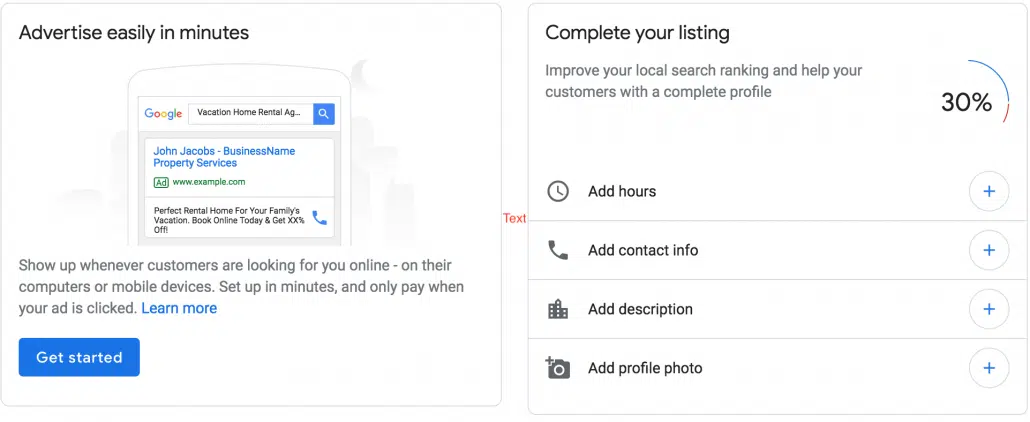
Access your dashboard immediately after verification. Complete every section. Dense profiles rank better and attract qualified guests.
Essential information to add:
- Hours of business: List hours you are available for contact.
- Direct contact information: Add an email or direct chat link alongside your phone number.
- Detailed descriptions: Describe amenities clearly. Sell the specific experience.
- Professional photos and video: High-quality visuals act as digital curb appeal. Treat this profile like a listing on a major OTA.
| Profile element | Basic profile impact | Optimized profile impact |
|---|---|---|
| Business information | Low visibility, generic searches miss your ideal guest | High visibility, specific guest matching, higher booking intent |
| Photos & videos | Undifferentiated listings, fewer clicks, low engagement | Engages guests instantly, builds trust, higher conversion rates |
| Guest reviews & responses | Limited social proof, profile often overlooked by search | Boosts ranking, builds credibility, directly influences booking decisions |
Navigating your Google Business Profile dashboard
Your dashboard serves as central command. Use it to manage reviews, create local ads, link Google Ads, and monitor performance metrics. This is where you control your local search presence.
Improve your map pack ranking
Ranking in the map pack is the first step. To dominate the results, you must aggressively manage your reputation. Solicit guest reviews and reply to every submission. Future guests audit your responses to gauge your professionalism. A measured response to a 3-star review often builds more trust than ignored praise.
Consistency validates your data. Confirm your business details match across all local directories. Finally, link directly to your Google Business Profile from your website. This signals authority and relevance to Google’s algorithm.
Integrating systems is critical for managing direct bookings and diverse portfolios. Vacation rental management software consolidates operations, automates communication, and handles reservations. It maintains consistent property details across channels, including Google, to prevent data discrepancies.
For hosts with 1-3 listings, Guesty Lite™ delivers core automation tools. Operators with 4-500 listings often deploy Guesty Pro™ for advanced features and dedicated onboarding. Guesty provides 24/7 support via phone, email, and live chat to resolve issues instantly.
FAQs
Visit the Google Business Profile website. Enter your business name, address, category (e.g., “vacation home rental agency”), and contact details. You must verify your address via a mailed postcard before the profile goes live.
Complete every section. Upload high-quality media, keep contact info current, and write compelling property descriptions. Actively encourage reviews and respond to every comment.
No, the tool is free. It lowers acquisition costs by increasing organic visibility and driving direct bookings without ad spend.
Create a single Google Business Profile for your management company. Add individual properties as “locations” under that main profile. If properties operate as distinct businesses with unique branding, use separate profiles.
Reviews determine rank and conversion. They signal trust to potential guests and the Google algorithm. Respond promptly to positive and negative feedback to demonstrate operational competence.
Google Business Profile creates organic presence on Search and Maps. Google Ads are paid placements based on bidding. The Profile builds long-term authority, while Ads provide immediate, targeted exposure.
The most common cause is incomplete verification. Ensure you have processed the postcard code. Other factors include incomplete profiles, incorrect categories, or address inconsistencies across the web. Double-check your data.

Guesty’s talented marketing team is comprised of passionate professionals who share insightful industry knowledge and shape brand narratives. By bringing a diverse blend of expertise to the table, we are the visionary architects behind the Guesty brand and innovative campaigns that help people understand our product.