TL;DR: Self check-in eliminates the biggest friction point in short-term rentals: coordinating arrivals. A WiFi-enabled smart lock with a keypad, paired with automated messaging, means guests get in without calling you at midnight, and you stop losing sleep (and reviews) to delayed flights. Here’s how to set it up right.
Why manual key handoffs cost you more than time
You’re managing two or three properties. A guest’s flight lands at 11 PM instead of 6 PM. Now you’re driving across town for a five-minute handover while your evening disappears.
Manual key exchanges create three problems that compound fast:
- Schedule dependency. Your availability dictates booking flexibility. Miss a handoff window, and that five-star guest becomes a one-star review.
- Instant Book hesitation. Without reliable self check-in, enabling Instant Book feels risky, but disabling it tanks your search visibility.
- Burnout trajectory. Being on-call for every arrival isn’t sustainable past two properties. It’s definitely not scalable to four.
Self check-in flips the equation. Guests arrive on their schedule. You confirm they’re in from your couch.
What hardware actually works for Airbnb self check-in?
Not all smart locks deliver the same guest experience. The deciding factor isn’t price, it’s whether your guest needs to download an app at 1 AM.
| Lock type | Guest experience | Your risk | Best for |
| WiFi smart lock with keypad | Enters code, door opens. No app required. | Low. Remote monitoring, auto-expiring codes | Most Airbnb setups |
| Bluetooth-only smart lock | Must download app, enable Bluetooth, troubleshoot pairing | Medium. Connectivity issues, frustrated guests | Tech-savvy guest demographics only |
| Traditional lockbox | Finds box, retrieves key, returns key at checkout | Medium-high. Lost keys, code sharing | Budget backup option |
| In-person handoff | Coordinates schedule, waits for host | Highest. Missed connections, negative reviews | Not recommended |
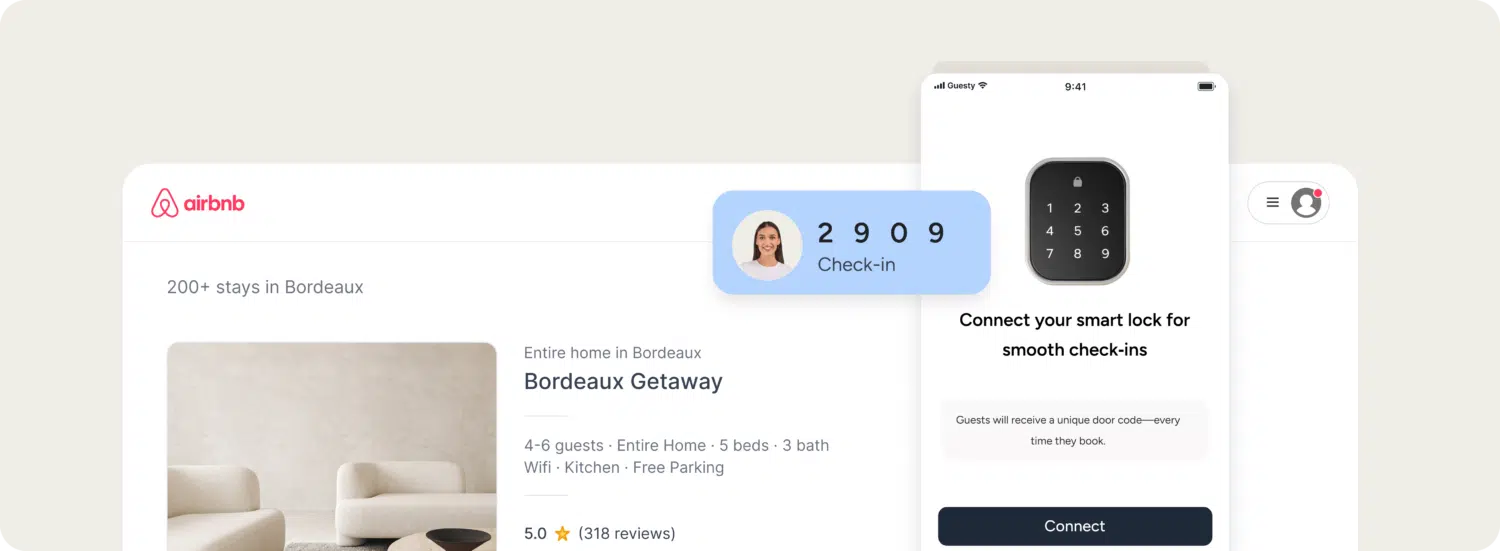
The standard setup: A WiFi-enabled keypad lock (Yale Assure Lock 2 and Schlage Encode are popular choices) lets you generate unique codes per reservation, monitor entry remotely, and avoid the “download our app” friction that international travelers hate.
How to set up keyless entry that actually works
Step 1: Install hardware with a backup plan
Mount your smart lock, but don’t stop there. Technology fails, so keep a physical key in a discreet lockbox as your failsafe. One locked-out guest can undo months of five-star reviews.
Pro tip: Choose locks with emergency power ports. A 9V battery touched to the right spot powers a dead keypad long enough to enter a code.
Step 2: Use unique codes, not a master code
A single code shared across all guests is a security liability and an operational blind spot. You can’t track who entered when, and past guests retain access indefinitely.
Generate reservation-specific codes that activate at check-in and expire after checkout. If your property management software integrates with your lock brand, this happens automatically. The code is created at booking, pushed to guest via message, and deactivated at checkout.
Step 3: Send instructions guests actually read
Dense paragraphs of arrival instructions get skimmed and forgotten. Structure your check-in message around the three questions every guest asks:
- “Where exactly is the entrance?” → Photo of the front door from street level
- “How do I use the lock?” → 15-second video or clear graphic showing the keypad sequence
- “What if it doesn’t work?” → Your backup plan: lockbox location, emergency contact number
With Guesty Lite, set up automated messages triggered by reservation events — booking confirmation, 48 hours before arrival, check-in time. The guest gets the right information at the right moment without you copying and pasting the same instructions for the hundredth time.
How to turn a smooth arrival into a five-star review
Check-in is the first impression. What happens in the next few hours determines whether that guest leaves a review at all, and what it says.
The post-arrival sequence
30 minutes after entry: Send a brief automated message confirming they’re in and flagging the essentials: WiFi password location, thermostat controls, anything guests consistently ask about.
Example: “Hi [Guest Name], glad you made it in! Wi-Fi password is on the kitchen counter. Let me know if you need anything.”
First evening: A quick check-in catches small issues (missing towels, confusing shower controls) before they become review complaints. One message, not a barrage.
Post-checkout: Request the review while the stay is fresh. Waiting a week means competing with their next trip’s memories.
Guesty Lite’s workflow automation handles this sequence across all your properties. Same timing, same tone, no manual sends. You monitor the unified inbox and step in only when a conversation needs a human.
When to intervene personally
Automation handles the routine. You handle the exceptions.
If a guest mentions “disappointed,” “dirty,” or “broken” in any message, that thread gets your immediate attention, not a scheduled reply. The difference between a 3-star and 5-star review is often a 20-minute response window.
Frequently asked questions
Airbnb favors listings that reduce booking friction. Self check-in lets you enable Instant Book confidently, which does improve search visibility. The algorithm rewards low cancellation rates and positive arrival experiences — both easier to deliver without manual handoff dependencies.
A mounted lockbox with a physical key, hidden but accessible. Give guests the backup location and code in your check-in message, framed as “just in case.” They’ll rarely need it, but knowing it exists reduces anxiety.
Automated messaging makes same-day arrivals possible. Set up a workflow specifically for bookings with less than 24 hours’ notice: immediate confirmation, instant code delivery, streamlined instructions. You capture revenue you’d otherwise turn away.
Yes. With conditional workflows, you can send families information about the high chair and pack-n-play location while business travelers get the desk setup and fastest WiFi connection point. Relevance beats generic every time.
Managing 1–4 properties and ready to stop playing schedule Tetris with guest arrivals? Guesty Lite gives you automated messaging, a unified inbox, and the workflows that make self check-in actually work.

Guesty’s talented marketing team is comprised of passionate professionals who share insightful industry knowledge and shape brand narratives. By bringing a diverse blend of expertise to the table, we are the visionary architects behind the Guesty brand and innovative campaigns that help people understand our product.